


How to setup a Canon EOS 7D with various lenses for a wedding shot (video)

eos 7d

CanonUSA posted an informative, 7 minutes tutorial video about how to set up for a professional wedding shot. A Canon [shoplink 337]EOS 7D[/shoplink] and different lenses (70-200mm, 24mm,35mm, 14mm etc) are used in the tutorial. The background music it at least weird, but the tutorial is cool and helpful in explaining a wedding shot setup and the how to of a successful shooting session.

Better Buys Recognizes Canon imageRUNNER ADVANCE C5500 Series With Editors’ Choice Award

2016-ec-logo-lores

Press release:

Color Multifunction Systems Recognized for Wide Range of Customer Offerings, Including Security Features, Finishing Options and Strong Scanning Capabilities

MELVILLE, N.Y., December 7, 2016 – Canon U.S.A., Inc., a leader in digital imaging solutions, today announced that Better Buys has recognized the Canon imageRUNNER ADVANCE C5500 Series with a Fourth Quarter 2016 Editors’ Choice award in the color multifunction category. Awards are given to a select group of office equipment products as a sign of excellence in quality, performance, and value, and are determined by evaluating features including price, speed, cost-per-page, paper handling and any unique features such as mobile printing capabilities, within each respective category.

Click here to open the rest of the article

Adobe Lightroom CC 2015.8 released, adds EOS M5 support and tethering for EOS 5D Mark IV

Above: an overview on “Reference View” in Lightroom CC 2015.8 by LoriGraceAz

From Adobe Lightroom Journal:

Today Lightroom CC(2015.8) / 6.8, Adobe Camera Raw 9.8 and updates to Lightroom for mobile are now available.  Please click here to read the Camera Raw release notes and click here to read all the Lightroom for mobile news.

Introducing Reference View

Reference View is a new view mode available in the Develop Module that allows you to compare 2 different images in order to make them visually consistent.  This is helpful when making a group of images from a single event look similar or setting the white balance appropriately in mixed lighting conditions.

To get started,

  1. Go to the Develop Module
  2. Click on Reference View.  Its on the Toolbar, and you may need to show the Toolbar if hidden
  3. Drag and Drop your Reference Photo onto the left pane.  You can change your Reference Photo by either dragging a different image onto the left pane or using the “Set as Reference Photo” context menu in the Library Module.
  4. Edit the active photo. Use the Reference Photo to guide your editing decisions.

Click here for more information on Reference View.

Performance Improvements

Lightroom CC (2015.8) / 6.8 includes ‘under-the-hood’ changes designed to improve the responsiveness of your Lightroom experience.  You should notice improvements in image editing responsiveness when background tasks (such as Preview Generation) are running, moving files between folders, running catalog backups.

Fit/Fill Improvements

You can now zoom to fit and zoom to fill.  Particularly when using ultra high-resolution (i.e. 4K and 5K) monitors, prior versions of Lightroom would not completely fill the Loupe window.

Additional Features

  • Ability to filter or create a Smart Collection for images that have Snapshots associated with them.
  • Export a Collection Set as a new catalog.
Click here to open the rest of the article

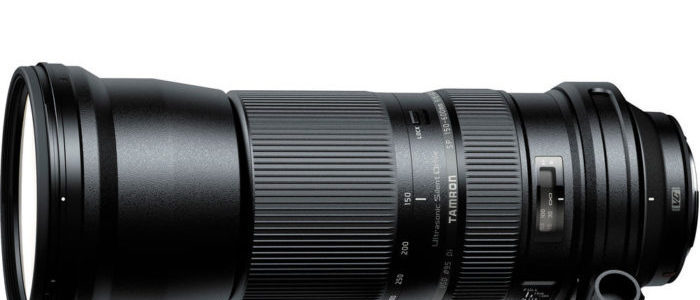
Tamron SP 150-600mm f/5-6.3 Di VC USD deal – $799 (reg. $1,069, today only, B&H)

Tamron SP 150-600mm

At a glance:

  • Canon EF Lens Mount
  • Aperture Range: f/5 to f/40
  • Three Low Dispersion Glass Elements
  • eBAND and BBAR Coatings
  • VC Image Stabilization
  • Ultrasonic Silent Drive Autofocus Motor
  • Full-Time Manual Focus Mechanism
  • Nine-Blade Circular Diaphragm
  • Removable Tripod Mount

The Tamron SP 150-600mm f/5-6.3 Di VC USD is B&H Photo’s DealZone deal of the day, and it’s only for today. The Tamron SP 150-600mm f/5-6.3 Di VC USD is on sale at $799, that’a $270 saving over the regular $1,069.

Today’s Gold Box and one day only deals at Amazon USAmazon DEAmazon UKB&H Photo, eBay and Adorama

Canon’s New hdAlbum EZ Service Can Transform Traditional Photo Book Creation Process

hdalbum ez

Press release:

Users can create stylish layouts with storylines for photo books with hdAlbum EZ app

MELVILLE, N.Y., December 7, 2016 – Canon U.S.A., Inc., a leader in digital imaging solutions, today announced the new hdAlbum EZ service, an innovative software solution that allows users to quickly and easily create a photo book keepsake that captures their memories. Building upon the success of the hdAlbum service launched in January 2015, this new hdAlbum EZ service features Canon’s new advanced EAGiAL technology, which automatically selects a user’s photos based on lighting, composition, and face recognition, and creates an elegantly, styled layout with a storyline. The hdAlbum EZ service offers users high-quality printing on the Canon DreamLabo 5000 inkjet production photo printer which produces images with rich, vibrant color and impeccable detail.

Accessible through the hdAlbum EZ App, the software helps reduce the amount of time needed to select shots from a large collection of photos, as well as create and edit a photo book. The hdAlbum EZ App even has a built-in function to automatically capture still frames from video files. This automatic feature has been included in response to the increase of users creating videos in recent years. This technology provides another way to capture compelling, live-action images. The hdAlbum EZ App will be available for compatible computers, tablets and smartphones.

“Sorting through files and selecting quality photos can be one of the most time-consuming steps in photo album creation,” said Toyotsugu Kuwamura, executive vice president and general manager, Business Imaging Solutions Group, Canon U.S.A., Inc. “The hdAlbum EZ automated software automatically detects and chooses photos for album creation. This time-saving solution provides an intuitive platform for users to best tell their story, while also allowing more time for creativity.”

For a look at hdAlbum EZ’s streamlined design and intuitive process, please click here. Visit shop.usa.canon.com/photobooks for the latest promotions and to get started on your own hdAlbum EZ photo book.

Click here to open the rest of the article

A Bit of Everything

Above: Kelvin White Balance for Awesome Urban Photography – The PixelHobo


Keep the Focus – A Meditation Guide for Street Photographers (free ebook) – Thomas Ludwig

Panoramic images: Creating panoramic – Canon Professional Network

Gear of the Year: Carey’s choice – Canon PowerShot G9 X – DPReview

Tamron announced a new sensor that Exceeds Far Beyond Human Visual Capability – Mirrorless Rumors

Canon lens construction – Canon Professional Network

100 million EF lenses : Canon Ambassadors reveal their favourites – Canon Europe

How to Take Professional Photos of Your Vacation – Laura Morita/Canon DLC

Which Canon Cameras Maintain Autofocus with Extenders at f/8 Max Aperture? – Shutter Muse

Zeiss Batis 18mm f/2.8 Astrophotography Review – Lonely Speck

The smiles behind the style: an enduring creative partnership – Lorenzo Agius on his career (CPN)


Below: 100 Photographs: The Most Influential Images of All Time Trailer – TIME