Canon PowerShot N Review (ephotozine)

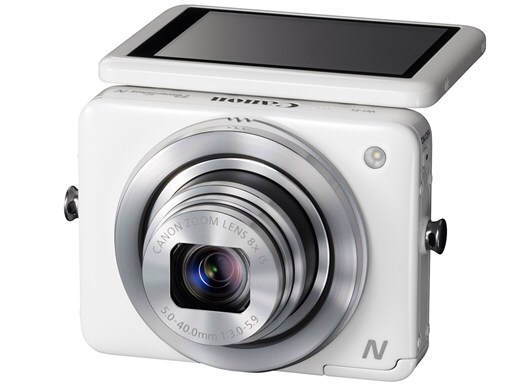
ephotozine published their comprehensive review of the Canon Powershot N, a true fun-cam with built-in WiFi. Test charts, sample images and more.

Core specs (from B&H’s product page):

  • 12.1MP High Sensitivity CMOS Sensor
  • DIGIC 5 Image Processor
  • 8x f/3.0 Optical Zoom Lens
  • 28-224mm Focal Length Equivalency
  • 2.8″ Capacitive Tilt-Touch LCD Panel
  • 1080p Full HD Video Capture
  • Built-in Wi-Fi Connectivity
  • One-Touch Mobile Device Connect Button
  • Creative Shot Mode

Canon Powershot N price check: [shopcountry 9369] [shoplink 9369]Powershot N[/shoplink]

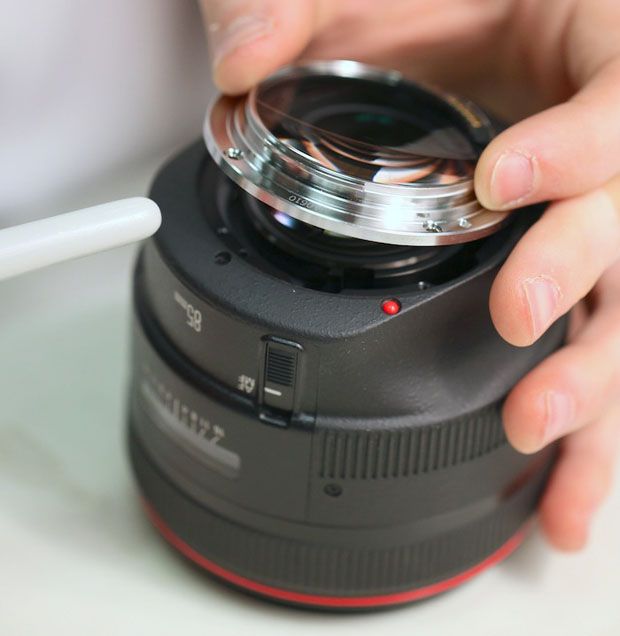
Want To Clean Your Canon Lens? Learn How To

Canon Lens
Image courtesy: PetaPixel

Roger Cicala posted an interesting article on PetaPixel. You know that pesky dust spots you see in your Canon lens? Well, they are not really a problem, as Roger states:

Here’s a question I get asked about 15 times a week: “How can I get the dust out of my lens?” The right answer is you don’t. All lenses have dust in them and it doesn’t affect the images at all 99% of the time. Even if you clean it all out, it will be back after you use the lens a few times.

However, there are some situations where you really want to open the lens and get rid of the dust. Be aware that opening a lens voids guaranty, and that it is a potential risky affair. Be sure to read the warnings before you proceed. The following Canon lenses are covered in the article.

  • Canon 17-55 f/2.8 IS(Canon 24-105, 24-70 f/4 IS, 24-70 f/2.8 II)
  • Canon 85mm f/1.2 L
  • Canon 85mm f/1.8 (Canon 100m f/2)
  • Canon 70-200 f/2.8 NON IS (Canon 70-200 f/2.8 IS I and II)
  • Canon 100-400 IS L (Canon 28-300 IS L)
[via PetaPixel]

Simply Amazing Take 2: More About Magic Lantern Hack For EOS 5D Mark III (and comparison with Blackmagic)

Yesterday I reported about the latest hack for the Canon EOS 5D Mark III [shoplink 2431](price & specs)[/shoplink] by the skilled Magic Lantern team (the forum discussion is going on here). The Magic Lantern hack is definitely going to change a few things in the videographer world: an EOS 5D Mark III becomes the most advanced 14-bit RAW recording system people can get for around $3000 (less than EUR 3000). For those who still don’t know: the Magic Lantern hack makes 14 bit RAW video output at 24fps feasible on the EOS 5D Mark III. The performance is amazing when compared to the 8-bit H.264 footage output (without the hack). Given the success of yesterday’s post I would like to post a follow-up.

First of all, a guide on how to install the Magic Lantern hack on your EOS 5D Mark III, provided by cinema5d. Get the Magic Lantern package (File –> Download) and follow cinema5d’s instructions.

Next, for all of you who are concerned that installing the Magic Lantern hack could brick their DSLR, have a look at Joe Marine’s article at nofilmschool. Hint: It will not brick your sensor. Be confident. While it is true that the hack is in its early stage, and that there will be random crashes and failures, there is no risk to ruin the sensor of the 5D Mark III (this was a concern by some users). The sensor does not have to do more work when using the hack.

Finally, at diyphotography they posted an article about why Magic Lantern Raw video is the best thing that happened to Canon.

More and more videos that show the impressing performance of the Magic Lantern hack show up. Below you’ll find a selection. Have fun!

Canon EOS 5D Mark III price check: [shopcountry 2431]

5D mark ii Magic Lantern RAW test (low light, high ISO) from Jon Andreas Sanne on Vimeo.

14-bit RAW on Canon 5D Mark III vs. factory default with CineStyle – Dynamic Range from Saad Rabia on Vimeo.

A RAW in the park. (Canon 5D mark III with Magic Lantern RAW module – short test) from Johnnie Behiri on Vimeo.

Canon EOS C100 Reviews Round-Up (Mostly Videos)


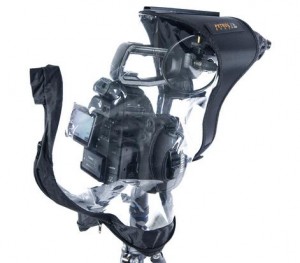
Time for a round-up of reviews about the Canon EOS C100. The Canon C100 is on sale with a $1000 discount at both Adorama and B&H. The body only option is yours for $5499 (B&H | Adorama), the kit with the EF 24-105mm f/4L IS lens is sold for $6,099 (B&H | Adorama). Btw, if you are looking for a raincover for your precious C100, Petrol Bags has one (source: cinescopophilia):

EOS C100

The C100 Rain Cover’s transparent polyurethane construction provides for maximum visibility, while remaining serviceable down to -4 degrees Fahrenheit/-20 degrees Celsius. A cleaver front cover section featuring a microphone sleeve of rip-stop fabric attaches to the Rain Cover via two waterproof zippers for extra weather protection. A hot shoe connector in the cover’s rigid front hood section anchors and stabilizes the rain cover on the camera. The PR400 also includes a 6” ABS track that allows for the addition of a mini light.

Before you dive into the videos, have a look why Cinematographer Ryan E. Walters prefers the EOS C100. There are 7 reasons for this: (source: nofilmschool)

  1. It Is The Craftsperson, Not The Tool, That Matters
  2. I’m Not A Rental House
  3. Some Tools Are Easier To Use Than Others
  4. I’m Not Interested In Hype, I’m Interested In Reality
  5. Protecting Vision Is Important
  6. Dynamic Range In Over Exposure Latitude Is Important
  7. Low Light Performance Is Important

First of all, learn what you need to know about the EOS C100 in the video below, made by Filmtools:

Or the next video, which gives you a good introduction to the C100, C300, C500, and the 5D Mark III [shoplink 2431](price & specs)[/shoplink].

Let us start with a video made by Joe Simon Films. They compare the EOS C100 to the EOS 5D Mark III [shoplink 2431](price & specs)[/shoplink]. They write:

We had a chance to use 2 Canon C100s to mix with our C300 to shoot an all EOS Cinema wedding. We put the C100 through the paces and compare it to our current wedding workhorse the Canon 5DMKIII.

This is not a scientific test but a test to see how the feel, look and weight of the cameras compares to the 5D and C300. Both of which we already own.

Tech info –
5D profile setting was on Neutral – Contrast and sharpness all the way down. I always use this profile to get a nice flat image and the best DR. I DON’Tuse cinestyle because I find in post I get much too much noise in the image.

C100 was set to CLOG, I also had NR set to 3. Sharpness all the to -10


Next, we have a video by Italian filmmaker Aldo Ricci. Some info about the used equipment:

Canon C100 – Lens Canon 24-70 2.8 – 70-200 2.8 and 16-354 2.8
BTS: CanonmarkIII – Lens 24-70 / 70-200
Cinevate slider

Canon EOS C100: Adorama | B&H.
Canon EOS C100 body only: B&H | Adorama
Canon EOS C100 with EF 24-105mm f/4L IS: B&H | Adorama

Simply Amazing: Canon EOS 5D Mark III Video Performance With Magic Lantern Hack

The latest hack for the Canon EOS 5D Mark III ([shopcountry 2431]) by the skilled Magic Lantern team is going to change a few things. For those who still don’t know: the hack makes 14 bit RAW video output at 24fps feasible on the EOS 5D Mark III. The performance is amazing when compared to the 8-bit H.264 footage output (without the hack).

This ground-breaking Magic Lantern hack transforms the EOS 5D Mark III in a sophisticated, professional video equipment. For instance, check the low light performance with the Magic Lantern hack compared to H.265 (source: EOSHD)

Isn’t it impressing? But there is more to be happy about. Below you can see some videos made by Saad Rabia that show the difference. Have a look how the Magic Lantern hack increases the sharpness and details of the video. Sure, the Magic Lantern hack it is not yet fully mature, but this is just a matter of time. As nofilmschool puts it:

There are a few bugs to work out at the moment, especially since this is so early in the life of the hack. Right now there is no audio in-camera and clips are limited to 4GB (which is about a minute of footage), but the focus has been on actually getting it working and stable before moving on to the other issues. The 4GB limit is not actually even a hardware limitation, it’s just the way the code is at the moment, so we will definitely see longer clip lengths. For the best quality, 1000x speed cards are recommended […]


[via nofilmschool and EOSHD]


Everything You Want To Know About The EOS 5D Mark III Firmware Update And Atomos Ninja 2

This video from Stefan Czech tells you everything you want to know about the new Canon EOS 5D Mark III [shoplink 2431](price & specs)[/shoplink] firmware update (1.2.1), HDMI, and the Atomos Ninja 2. More information can be found in the planet5d forum.

Canon EOS 5D Mark III price check: [shopcountry 2431]

Timeline:

00:01:15 Feedback on Canon 5D Mark III

00:01:48 Introduction to Clean HDMI Out

00:02:05 Firmware (3 Focus)

00:02:16 Definition of Clean HDMI Out (Guidelines)

00:03:28 Introducing Atomos Ninja 2

00:03:59 Transmitting HDMI Signal and Timecode

00:04:30 Delivering Sound from HDMI Signal to External Recorder

00:06:05 What is Atomos Ninja 2? (How it records)

00:06:50 Two codecs of Ninja 2 and what works best for you

00:09:24 Storage explained

00:10:35 ProRes codec explained

00:11:46 Internal recording signal vs External recording signal

00:12:56 Ninja 2 as field monitor (Peaking)

00:13:50 Aperture Adjustment explained (Zebra)

00:14:38 False Color

00:15:00 Watch, edit and export recordings using Ninja 2

00:15:36 Difference between footage recorded on 4:2:0 and 4:2:2

00:16:40 Sample color enhancement

00:18:13 Menu selection and adjustments in 5D Mark III before attaching to HDMI device

00:20:15 Attaching Hard Drive to Ninja

00:21:02 Setting up Ninja 2 for the first time

00:25:32 How to record externally only on Ninja 2 (Magnification tricks)

00:27:49 Tips when recording longer footage using Ninja 2

00:28:49 Ports, Power source and Battery options of the Ninja 2

00:30:03 Using a wireless transmitter for the audio system (Audio recording explained)

00:31:20 Using Zacuto Pincher to secure camera

00:32:08 Using a Steadicam with the Ninja 2

00:34:22 Canon and Atomos working together to create Ninja

00:35:20 Product Price and content included with Ninja 2

00:36:56 Availability of Ninja 2 and special deal from Atomos

00:37:23 Hard Drive and HDMI Cable not included in the package

00:37:33 What HDMI cable to use

[via planet5d]