Updated EOS 5D Mark III User&Owner Manual
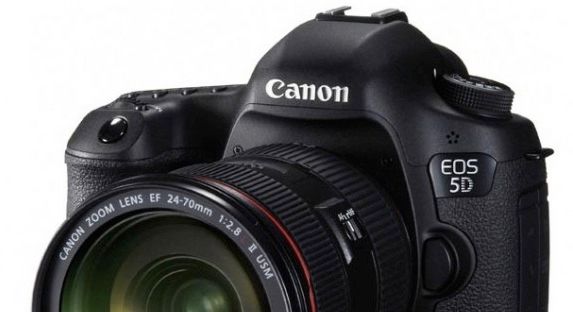
Looks like there is an updated version of the EOS 5D Mark III user manual (according to this forum post). Not yet clear what changed from the first version of the user guide. The PDF of the manual can be downloaded here. If someone knows what’s the difference with the previous one please let me know.
For the latest 5D Mark III pictures uploaded to Flickr click here.
5D Mark III availability & price check: Amazon, B&H, Adorama, Canon USA, J&R, Digitalrev, eBay, rent it at Borrow Lenses


David
2 years ago |please find a basic diff below.
< indicates original manual
> indicates updated version
2d1
C
1156,1158c1156,1160
< 3 SetTurn the dial to select the
< the date and time.
3 Set[London] iszone. default.
> the time
> set by
> Turn the dial to select [Time
> zone].
1160,1162c1162,1163
< Turn the dial to select the
< desired setting, then press
< (Returns to ).
—
> Turn the dial to select the time
> zone, then press .
1165,1167c1166,1168
< 4 SetTurn the dial to select [Time
< the time zone.
4 SetTurn the dial to select the
> the date and time.
> number.
1169,1170c1170,1172
< Turn the dial to select the time
< zone, then press .
---
> Turn the dial to select the
> desired setting, then press
> (Returns to ).
1177d1178
When the daylight saving time is set
1181,1182c1183,1184
< O
C6
> O daylight saving time will be canceled
1184c1186
Exit the setting.
1191,1194c1193,1196
< In step 4, the time displayed on the upper right is the time difference
< compared with Universal Time. If you do not see your time zone, set the
< time zone while referring to the difference with Universal Time.
In step 3, the time displayed on the upper right is the time difference
> compared with Coordinated Universal Time (UTC). If you do not see your
> time zone, set the time zone while referring to the difference with UTC.
> 37
1830c1832
Movie playback count Unchanged Movie recording size 1920x1080/IPB
2406,2410c2408,2412
< EF400mm f/2.8L II USM EF16-35mm f/2.8L USM EF70-200mm f/2.8L USM
< EF400mm f/2.8L IS USM EF16-35mm f/2.8L II USM EF70-200mm f/2.8L IS USM
< EF400mm f/2.8L IS II USM EF17-35mm f/2.8L USM EF70-200mm f/2.8L IS II USM
< TS-E45mm f/2.8* EF20-35mm f/2.8L EF80-200mm f/2.8L
EF400mm f/2.8L II USM EF16-35mm f/2.8L USM EF28-70mm f/2.8L USM
> EF400mm f/2.8L IS USM EF16-35mm f/2.8L II USM EF70-200mm f/2.8L USM
> EF400mm f/2.8L IS II USM EF17-35mm f/2.8L USM EF70-200mm f/2.8L IS USM
> TS-E45mm f/2.8* EF20-35mm f/2.8L EF70-200mm f/2.8L IS II USM
> TS-E90mm f/2.8* EF24-70mm f/2.8L II USM EF80-200mm f/2.8L
2427,2428c2429,2431
< EF15mm f/2.8 Fisheye EF24mm f/2.8
EF20mm f/2.8 USM EF28mm f/2.8 IS USM
> EF14mm f/2.8L II USM EF24mm f/2.8 EF24-70mm f/2.8L USM
> EF15mm f/2.8 Fisheye EF24mm f/2.8 IS USM
4241c4244
1 Under the [z2] tab, select [WB
4263,4265c4266,4268
< One level of the blue/amber correction is equivalent to 5 mireds of a color
< temperature conversion filter. (Mired: Measuring unit indicating the
One level of the blue/amber correction is equivalent to approx. 5 mireds
> of a color temperature conversion filter. (Mired: Measuring unit indicating
> the density of a color temperature conversion filter.)
4295,4296c4298,4300
< During WB bracketing, the maximum burst for continuous shooting will be lower and
During WB bracketing, the maximum burst for continuous shooting will
> be lower and the number of possible shots will also decrease to approx.
> one-third the normal number.
4531c4535
Creating a Folder
5519c5523
Select [Select image for multi. expo.].
5532c5536
Take the picture.
5539,5540c5543,5545
< Images shot with highlight tone priority set to [Enable] cannot be
Images shot with highlight tone priority set to [Enable], images of which
> the aspect ratio is other than 3:2 (p.204), or those with cropping information
> appended (p.320) cannot be selected as the first single exposure.
5666,5667c5671,5672
< During Live View shooting and movie shooting, attaching the
During Live View shooting and movie shooting, attaching the eyepiece
> cover is not necessary.
6189c6194
3 5760×3840 5120×3840 5760×3240 3840×3840
6192c6197
3840×2560 3408×2560* 3840×2160 2560×2560
6198,6201c6203,6206
< C O
< 3520×2640 3960×2228* 2640×2640
< (10.45 megapixels) (9.3 megapixels) (8.8 megapixels) (7.0 megapixels)
C O
> 3520×2640 3960×2228* 2640×2640
> (10.5 megapixels) (9.3 megapixels) (8.8 megapixels) (7.0 megapixels)
> 2880×1920 2560×1920 2880×1624* 1920×1920
6203c6208
2880×1920 2560×1920 2880×1620 1920×1920
6206c6211
1920×1280 1696×1280* 1920×1080 1280×1280
6209c6214
720×480 640×480 720×400* 480×480
6607,6609c6612,6614
< If there is a very bright light source in the picture, such as the sun, the
< bright area may appear black on the LCD monitor. However, the actual
If there is a very bright light source in the picture, the bright area may
> appear black on the LCD monitor. However, the actual captured image
> will correctly show the bright area.
6622c6627,6629
The focus preset function is possible during Live View shooting only
> when using a (super) telephoto lens equipped with the focus preset
> mode marketed since the second half of 2011.
6667d6673
C O
6670,6671c6677
< 4
halfway, the camera will focus with
6673,6674c6679,6680
< Shoot the movie.
< Press the button to start
—
> 4 Shoot the movie.button to start
> Press the
6679c6685,6686
Recording movie
> To stop shooting the movie, press the
6681a6689
> Regarding the cautions for movie shooting, see page 226.
6915a6924,6925
> Autofocusing during movie shooting may momentarily throw the focus far
> off or change the exposure.
6926a6937
> PY
6929d6939
O
6931a6943
> C
6933d6944
< O
6935d6945
< C
6951,6953d6960
< By connecting stereo headphones (commercially available) equipped
< with a 3.5 mm mini plug to the camera’s headphone terminal (p.19), you
By connecting stereo headphones (commercially available) equipped
> with a 3.5 mm mini plug to the camera’s headphone terminal (p.19), you
> can listen to the sound during movie shooting.
6964a6975,6977
> When using a (super) telephoto lens equipped with the power focus
> mode marketed since the second half of 2011, power focusing is
> possible during movie shooting.
6965a6979,6980
> O PY
> C
6968d6982
< PY
6971d6984
< O
6973d6985
< C
7409c7421
PY
7412c7424
O
7415c7427
C
7426,7428c7438,7444
< Autofocusing during movie shooting is not recommended since it may
< momentarily throw the focus far off or change the exposure.
If there is a very bright light source in the picture, the bright area may
> appear black on the LCD monitor. In movies, the bright areas will be
> recorded in almost the same way you see it on the LCD monitor.
> In low light, noise or irregular colors may appear in the image. In movies,
> the bright areas will be recorded in almost the same way you see it on
> the LCD monitor.
> 241
7644,7668c7660,7684
< Select [Image jump w/6].
< 1 Under the [32] tab, select [Image
< jump w/6], then press .
< 2 Select the dial to select the jump
< Turn the
< jump method.
< method, then press .
< d: Display images one by one
< e: Jump 10 images
< f: Jump 100 images
< PY
< g: Display by date
< h: Display by folder
< O
< i: Display movies only
< j: Display stills only
< C k: Display by image rating (p.255)
< Turn the dial to select the
< rating.
< 3 Browse the button to play back
< Press
< by jumping.
< images.
< On the single-image display, turn the
< dial.
—
> Select [Image jump w/6].
> 1 Under the [32] tab, select [Image
> jump w/6], then press .
> 2 Select the dial to select the jump
> Turn the
> jump method.
> method, then press .
> d: Display images one by one
> e: Jump 10 images
> f: Jump 100 images
> PY
> g: Display by date
> h: Display by folder
> O
> i: Display movies only
> j: Display stills only
> C k: Display by image rating (p.255)
> Turn the dial to select the
> rating.
> 3 Browse the button to play back
> Press
> by jumping.
> images.
> On the single-image display, turn the
> dial.
7673,7674c7689,7690
< If the card contains both [Movies] and [Stills], select either one to
If the card contains both movies and still photos, select [Movies] or
> [Stills] to display only either ones.
11573,11578c11589,11591
< Shutter speeds: 1/8000 sec. to 1/60 sec. (Scene Intelligent Auto mode),
< X-sync at 1/200 sec.
< * With a wide-angle lens, the shutter speed may be 1/60
< sec. or slower.
< 1/8000 sec. to 30 sec., bulb (Total shutter speed range.
Shutter speeds: 1/8000 sec. to 30 sec., bulb (Total shutter speed range.
> Available range varies by shooting mode.), X-sync at
> 1/200 sec.
11586d11598
< PY
11590c11602
PY
11592d11603
O
11595a11608
> C
11687,11688c11700
< Electronic level: Horizontal: 1° increments, ±6°
Electronic level: Provided
11762,11763c11774,11775
< (with fully-charged Battery Pack LP-E6)
* With fully-charged Battery Pack LP-E6
> O
12123a12136,12137
> If install screen for “Microsoft Silverlight” is displayed during
> installation, install “Microsoft Silverlight”.
12555c12569
April 2012. For information on the camera’s compatibility with any lenses and
12557c12571
CPH-E002-001 © CANON INC. 2012
Frank
2 years ago |Thanks David!