Skylum Luminar 4.2 Released, Adds “AI Augmented Sky” Feature
Skylum released Luminar 4.2, an update that brings he AI Augmented Sky feature.
The Skylum Luminar 4 update free and is installed from within the application. You can get Luminar 4 with a $10/€10 discount by using code WATCH at checkout (reg. $89).
The video below shows what you can do with the AI Augmented Sky feature.
Press release:
Luminar 4.2 opens up the doors to creativity with sky-based composite photography opportunities
With new AI Augmented Sky capabilities, photographers can create unique, one-of-a-kind digital art pieces.
NEW YORK, NY – March 19, 2020 — Today, Skylum announced the latest update for its flagship product, Luminar, version 4.2. This free update for all Luminar 4 users contains important enhancements across the application, plus a brand-new feature — AI Augmented Sky — to help photographers create incredible digital art.
While Luminar remains dedicated to being an award-winning photo editor, it also expands into being a creative powerhouse, allowing artists to express themselves through new, fun and unconventional ways of editing images.
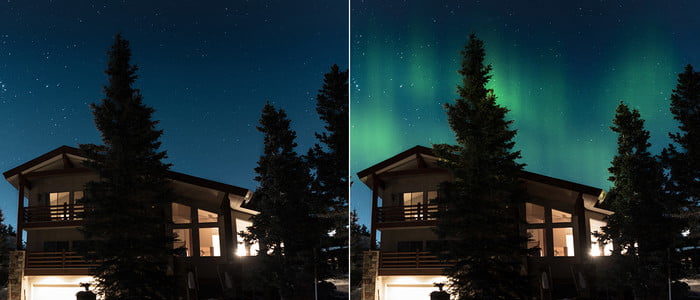
The new AI Augmented Sky tool lets photographers transform their photographs to the new heights, by helping create unique digital art creations. The tool lets photographers place different objects directly on the sky, enabling creatives to make either a realistic landscape or transform it into something straight out of a fairy tale.
NEW AI Augmented Sky
In the Creative tab inside Luminar 4.2, there’s a new AI Augmented Sky tool present. Artists can choose objects from the Luminar database or use their own. Even with photos that have complex backgrounds like trees or buildings, there’s no need to involve masking or layers. Instead, the object seamlessly fits into the photograph, resulting in realistic self-expression.
AI Augmented Sky detects a photo’s sky automatically and adds the chosen element to the sky area. Thanks to content-aware technologies, foreground objects are taken into account automatically, making the object blend naturally with the sky. And if you want more control over the placement, you can easily drag the new element around the sky area.
“We’re really excited to see how photographers use the AI Augmented Sky to create digital works of art,” said Dima Sytnyk, Co-Founder and Chief Product Officer of Skylum. “AI Augmented Sky can be used to make everything from subtle tweaks, like moving the moon in the sky, or to totally transform the world around us. The possibilities are endless!”