LensRentals publishes Canon EF 24-105mm f/4L IS II MTF Results, and they are not so exciting

EF 24-105mm f/4L IS II

Canon EF 24-105mm f/4L IS II: [shopcountry 40057]

At a glance:

  • EF-Mount L-Series Lens/Full-Frame Format
  • Aperture Range: f/4 to 22
  • Four GMo Aspherical Elements
  • Air Sphere Coating
  • Ring-Type Ultrasonic Motor AF System
  • Optical Image Stabilization
  • Internal Focus; Full-Time MF Override
  • Zoom Lock Switch; Fluorine Coating
  • Dust- and Water-Resistant Construction
  • Rounded 10-Blade Diaphragm

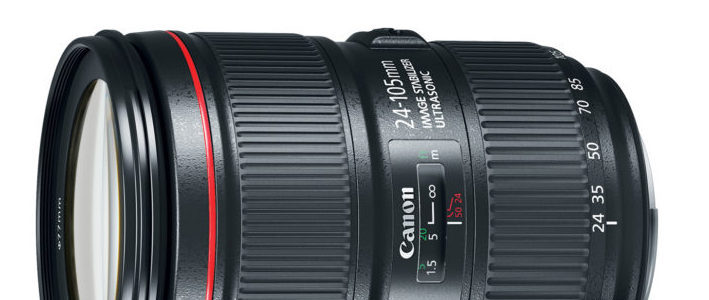
LensRentals posted their MTF lab test results for the Canon EF 24-105mm f/4L IS II, and while they stress that they made only a MTF test and not a real world test, the figures for the new [shoplink 40057]EF 24-105mm f/4L IS II[/shoplink] are not so much superior to the figures of the lens it replaces, the [shoplink 230]EF 24-105mm f/4L IS[/shoplink]. In the conclusion, Roger Cicala writes:

[…] on the basis of MTF, the 24-105 f/4 IS II is a decent lens, but not a spectacular upgrade. Would I upgrade my old 24-105 f/4 IS? Nope. If I was in the market would I buy one? Well, I’d wait for the price to come down or for it to be available as a kit lens with a new camera. One other thing to consider is that the new 24-105mm is significantly larger than the original version, and for some people, that’s going to be a negative for a walk-around lens. Read the review…

The new EF 24-105mm f/4L IS II sells for $1,099, the previous version is yours for $623.

Still Live: refurbished Canon EOS 80D $849, EOS M3 $299, and more deals

eos m3
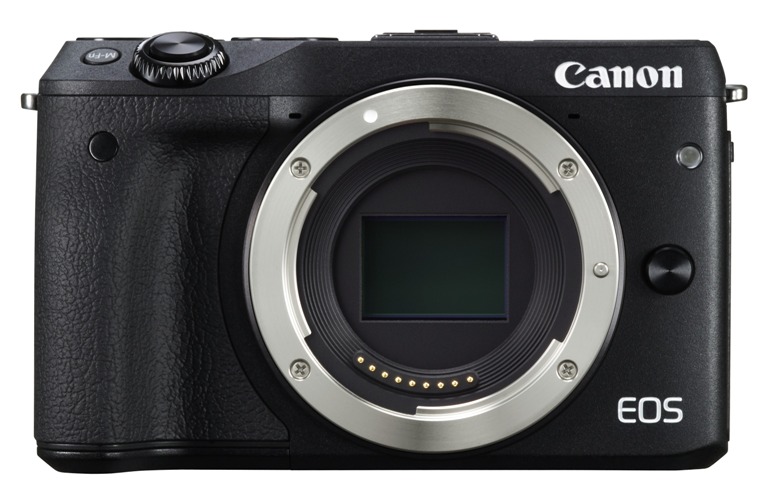
Refurbished EOS M3 at $299

Still looking for deals? There is not much left at the Canon Store but some good deals are still there. However, the Canon Store started a landing page for Cyber Week with new deals and promotions.

Click the links below and look for the refurbished camera or lens or other Canon gear you want. I just list some examples:

All listings:

Many of the Black Friday/Cyber Monday deals are still live. Click here to see all listings.

Photolemur announce the world’s first AI Based Photo Enhancement Tool

photolemur

Photolemur for Mac is available for pre order for just $29

Press release:

Photolemur – The World’s First AI Based Photo Enhancement Tool

Delivers Professional Looking Images for Everyone

Built On Artificial Intelligence to Constantly Improve Enhancements

Photolemur for Mac, the world’s first fully automatic photo enhancement solution has been launched. Designed for anyone who takes photos, Photolemur gives users the ability to rapidly process dozens of photos, giving great results on a whole range of images in minutes. Photolemur ensures that anyone who takes photos, but doesn’t want to waste hours editing them, no longer needs to.

Using groundbreaking technology and AI, Photolemur delivers natural image enhancements automatically and then uses Artificial Intelligence to learn the enhancements that you like or dislike to improve in the future. 

Find out more at www.photolemur.com

What Makes Photolemur different from Photo enhancement tools

Photolemur doesn’t have any hard coded filters, rather, it applies specific enhancements to each image. Powered by new technology which recognizes objects, faces, trees, sky, foliage and more, Photolemur differentiates between portraits, landscapes and macro photographs and applies the right enhancements for those images. There is almost no human involvement. Just load your images and let Photolemur do the work for you.

Why Photolemur?

Everyone wants great photos. Whether they’ve been taken on cameras or on their smartphones, those images are memories and snapshots of special moments. But photo editing is a time intensive task and most people simply don’t get round to it. Millions of great photos never get shared or even looked at again. Non use of photos can be because the idea of editing outs people off, or because when they look back at an image the shot doesn’t capture the scene as vividly as they remembered. The details that make an image great are often missing.

Photolemur is the fastest way for you to enhance any photo. It brings natural, vivid looks to photos, just the way we see with our eyes, and the way we remember a scene. Photolemur doesn’t change the image or bring in effects, it reveals the hidden details that made the image great in the first place.

Unlike photo editing tools, Photolemur does everything by itself, removing the need for manual control and heavy human involvement. However Photolemur doesn’t use preset settings to make changes, it uses previous experience to identify borders, objects, sky, foliage and more, and makes the necessary adjustments to the image.

Once Photolemur has done its work, you can share your images immediately to social media. This simple process means more great images and memories can be shared.

How Does It Work?

Photolemur is designed to have the least human involvement possible. Behind the scenes, Photolemur analyses millions of pixels per second, identifying individual features such as trees, faces, foliage etc. and automatically makes enhancements which make your image stunning.

As you bring in more images, every saved or shared photo builds a database of successful enhancements, and every non-saved image goes into an unsuccessful database. This ensures that all future enhancements are built on a record of success. Photolemur is constantly learning what you like and don’t like.

For the user, it’s simple.  Open an image in Photolemur, or drag an image into the application from anywhere on your Mac.

Photolemur will make its enhancements and from there you can crop your image as you need to, and then save it or automatically share to social media.

Key Enhancements

Photolemur runs a number of key enhancements, including:

Automatic color recovery brings back lost colours and makes your images pop in the way you remember the scene

Sky Enhancement delivers more natural and vivid clouds and skies

Exposure Compensation automatically detects and compensates for inaccurate exposure settings that may have affected your photos, making dark images brighter and vice versa.

Smart Dehaze automatically detects and removes unnatural haze, fog, mist, dust or smog, enhancing the colors and overall look of your photos without being unrealistic

Natural Light Correction considers the time of day of your photos and adjusts tones, exposure and contrast to bring out the natural colors and lighting

Foliage Enhancement automatically picks out individual trees, leaves and any other kind of plant or shrub and adjusts colors, sharpness and other features to bring the beauty back to your image. 

Noise Reduction automatically finds and removes unwanted digital noise that is most often created by slow shutter speeds in low light situations.

Tint Perfection automatically analyzes your photos to find the best tint. Dependant on several variables, including the image and its composition

JPG Fix automatically brings back the lost detail that can happen when you save to jpeg format

Face recognition automatically detects faces, then works to clean up any imperfections or blemishes. From portraits to team photos or even selfies

Horizon Straightening automatically analyzes and adjusts for any slightly crooked horizons or backgrounds. Photolemur easily aligns that perfect sunset.

In addition to these enhancements, Photolemur also features:
  • Batch Processing up to 40 Photos

  • Plug Photolemur into Apple Photos Extension

  • RAW Processing (800+ cameras)

More from The Photolemur Team

Photolemur for mac is launching December 17th, with pre-orders starting now. A Windows version will be available in early 2017. Mobile, online and corporate versions of Photolemur are being developed for launch during 2017.

Preorders

Photolemur is available for pre order for just $29 from www.photolemur.com

Canon patent for curved sensor design (to suppress vignetting)

canon patent

Canon’s labs working on a curved sensor design? At least a new patent suggests it.

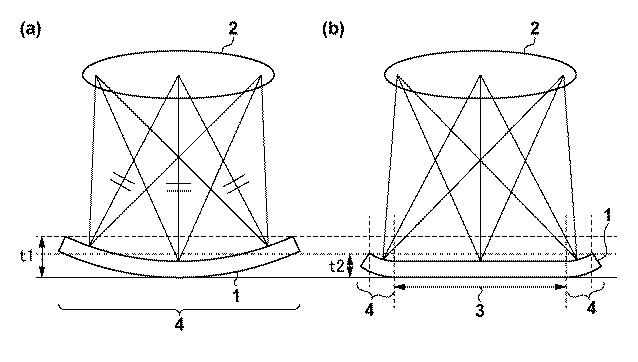
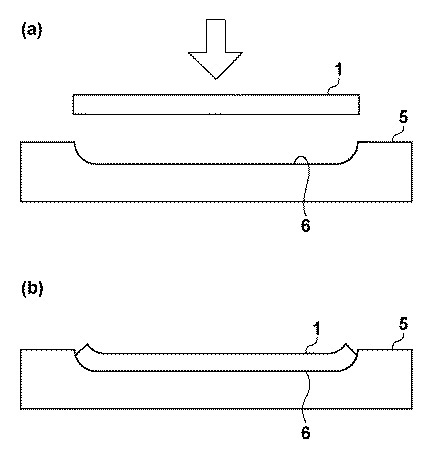
The patent refers to a curved sensor design with should suppress vignetting artefacts to a large degree.

  • Patent publication number 2016 – 197663
    • Release date 2016.11.24
    • Application date 2015.4.3
  • Canon patent
    • Make the central part flat in shape where light falloff is not noticeable
    • The surrounding portion where the drop in light quantity is conspicuous is defined as a curved shape

p

Excerpt from the patent literature:

[Claim(s)] [Claim 1] It has an imaging surface which carries out light reception of the light from an object imaged with a lens,
An image sensor, wherein the aforementioned imaging surface has a flat shape part and a curved shape section.
[Claim 2] The image sensor according to claim 1 having made a central part of the aforementioned imaging surface into a flat shape part, and making a periphery of the aforementioned imaging surface into the aforementioned curved shape section.
[Claim 3] The image sensor according to claim 2, wherein a position of a boundary between said flat shape part and the aforementioned curved shape section is set as the same distance to one reference point on the aforementioned imaging surface.
[Claim 4] The image sensor according to claim 3, wherein the aforementioned imaging surface has a picture element region where a unit pixel is arranged at matrix form.
[Claim 5] The image sensor according to claim 4 which is provided with the following and characterized by the aforementioned valid pixel area comprising said flat shape part and an aforementioned curved shape section.
A valid pixel area which outputs a signal [ picture element region / aforementioned ] according to light income.
A black reference picture element region which outputs a black reference signal.

[Claim 6] The image sensor according to claim 5, wherein the aforementioned reference point is placed at the center of the aforementioned valid pixel area.
[Claim 7] The aforementioned black reference picture element region adjoins the aforementioned valid pixel area, and is arranged, and, in the aforementioned black reference picture element region, the part or whole serves as a curved shape section, The image sensor according to claim 5 or 6, wherein curvature of a curved shape section of the aforementioned black reference picture element region differs from curvature of a curved shape section of the aforementioned valid pixel area.
[Claim 8] The image sensor according to claim 7, wherein curvature of a curved shape section of the aforementioned black reference picture element region is smaller than curvature of a curved shape section of the aforementioned valid pixel area.
[Claim 9] An image sensor of a description in any 1 item of Claims 5-8, wherein the aforementioned black reference picture element region comprises a shaded unit pixel provided with a photoelectric conversion part.
[Claim 10] An image sensor of a description in any 1 item of Claims 5-8, wherein the aforementioned black reference picture element region comprises a unit pixel without a photoelectric conversion part.
[Claim 11] An image sensor of a description in any 1 item of Claims 1-10,
The aforementioned lens,
An imaging device characterized by preparation ******.
[Claim 12] The imaging device according to claim 11, wherein the aforementioned reference point is placed on an optic axis of the aforementioned lens.

[via Egami]

Canon release free EOS-1D X Mark II Auto-Focus Setting Guidebook

eos-1d x mark ii

Canon EOS-1D X Mark II: [shopcountry 37157]

At a glance:

  • 20.2MP Full-Frame CMOS Sensor
  • Dual DIGIC 6+ Image Processors
  • 3.2″ 1.62m-Dot Touchscreen LCD Monitor
  • DCI 4K Video at 60 fps, 8.8MP Still Grab
  • 61-Point High Density Reticular AF II
  • Native ISO 51200, Expanded to ISO 409600
  • 14 fps Shooting, 16 fps in Live View
  • Dual Pixel CMOS AF and Movie Servo AF
  • Built-In GPS, CFast & CF Card Slots

Canon Professional Network released the AF settings guidebook for their flagship, the Canon EOS-1D X Mark II.

The 148-page guidebook explains in detail the technical elements of the AF system and highlights other key functionalities that photographers need to know and understand in order to get the very best from Canon’s pro-series flagship, such as Movie Servo AF, using Auto ISO and much more.

In the guidebook are detailed overviews and explanations of the new AF algorithm and AI Servo AF III+ along with a list of the AF Configuration Tool and Presets, with comprehensive explanations on how each Case Setting works and when to choose them.

The guidebook is divided into six parts, consisting of two chapters on the AF Configuration Tool (Presets and Parameters), as well as chapters on AF area selection modes, 61-point reticular AF cross-type points, release property settings and anti-flicker shooting plus utilising the AF and Movie Servo AF and other useful functions.

Click here to download the AF settings guidebook.