Price increase for Canon gear coming June 19 [CW4]

canon rumors

As anticipated a month ago (though we were wrong on the exact date), Canon will raise prices for their products after June 19.

According to my information there will be a general price increase by 2.7% on all imaging products, with some exceptions. Six mid-range DSLR models will see an increase between 6% and 11.5%, and 38 lenses will increase between 11% and 12.7%.

Mail-in rebate schema may also change.

That’s what happens when Leaf Cutter Ants chew away on your gear

The video above tells the story that happened to two photographers who wanted to set up a photo trap to capture a shot of a jaguar.

Things didn’t work out as expected. They were using a Canon [shoplink 337]EOS 7D[/shoplink], an off-camera flash, and an IR sensor. Everything seemed fine, the surprise came when they went back the day after. A horde of leaf cutter ants destroyed all the equipment. Incredible what this little pesky insects can do!

[via PetaPixel via The Jungle Diaries]

Adobe Lightroom 6.6/CC updates available for download (with new “guided upright” feature)

Above: Introduction to the new “Guided Upright” feature of Lightroom.

Adobe released updates for [shoplink 30426]Lightroom 6[/shoplink] and Lightroom CC. From Adobe:

Lightroom CC 2015.6 and Lightroom 6.6 are now available.  The goal of this release is to provide additional camera raw support, lens profile support and address bugs that were introduced in previous releases of Lightroom.  This release also includes a new Guided Upright feature for Creative Cloud members.

Thank you for all your feedback and passion for Lightroom.

Introducing Guided Upright 

We included Upright as a tool that helped Lightroom customers easily straighten images, fix horizons, and reduce or eliminate the keystone effect in buildings.  Upright works well when there are prominent vertical and horizontal lines.  Not all images contain prominent lines, limiting the effectiveness of Upright.

Starting with Lightroom CC 2015.6, Guided Upright allows you to provide ‘hints’ that enable Upright to work its magic.  You draw the vertical and horizontal lines directly on the image and Upright will automatically transform the image.  Here’s how to get started.

  1. Select an image and click on the Develop Module.
  2. Enable Lens Profile Corrections.  Upright works better with Lens Profile Corrections.
  3. Notice that there is a new “Transform” Panel.   Transform includes both Upright and the manual perspective correction sliders together in a convenient place.
  4. Within Transform, click on the “Guided” button.
  5. Draw 2-4 guides on the image.  Upright will transform the image once you draw at least 2 guides.
  6. Fine tune the results (if needed) with the manual transform slides, including the new X and Y transform sliders.  They can be used for  repositioning/moving the image within the canvas after applying strong perspective corrections to choose which part of the (warped, non-rectangular) image to show within the rectangular canvas.
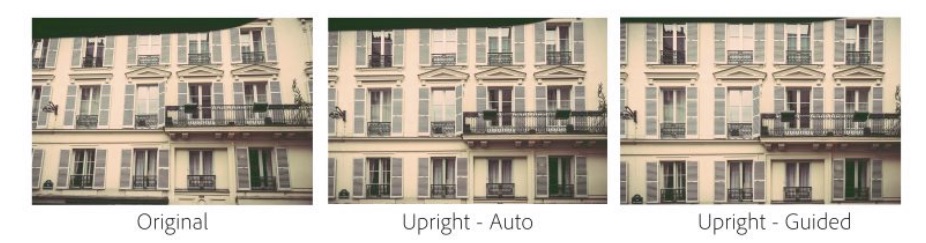
lightroom

Check out this great video by Julieanne Kost to learn more about Guided Upright!

New Camera Support in Lightroom CC 2015.6 / 6.6

  • Canon PowerShot G7 X Mark II
  • Leica M-D (Typ 262)
  • Nikon COOLPIX B700
  • Panasonic DMC-GX85 (DMC-GX80, DMC-GX7MK2)

Also please note that Lightroom CC 2015.6/6.6 also includes camera matching color profiles for the Pentax 645Z, Pentax K-1, and Pentax K-3 II cameras.

Additional Updates in Lightroom CC 2015.6 / 6.6

  • Merge to Panorama and HDR now works with Smart Previews.  Previously, Lightroom required the use of original images for the Merge to Panorama or HDR features.
  • The Preferences -> Lightroom mobile section now contains a “Pending Sync Activity” section.  This area is useful for helping identify any potential issues related to image sync across the Lightroom family of applications (desktop, mobile and web).

Tethered Camera Support for the following cameras:

  • Canon EOS-1D X Mark II
  • Canon EOS 80D
  • Canon EOS 1300D / Canon Rebel T6

New Lens Profile Support in Lightroom CC 2015.6 / 6.6

Mount Name
Canon EF Canon EF-S 18-135mm f/3.5-5.6 IS USM
Canon EF Canon EF 100-400mm f/4.5-5.6L IS II USM +1.4x
Canon EF Canon EF 100-400mm f/4.5-5.6L IS II USM +2.0x
Canon EF TAMRON SP 85mm F1.8 Di VC USD F016E
Canon EF TAMRON SP 90mm F2.8 Di MACRO VC USD F017E
Canon EF-M Rokinon 10mm f/2.8 ED AS NCS CS
Canon EF-M Samyang 8mm f/3.5 UMC Fish-Eye CS II
Canon EF-M Samyang 10mm f/2.8 ED AS NCS CS
Canon EF-M Samyang 100mm f/2.8 ED UMC MACRO
Canon EF-M Samyang 135mm f/2 ED UMC


More at Lightroom Journal 

First batch of Canon Online Learning Classes are live

Above: Photo 101: How To Take Great Pictures with Rudy Winston

Canon announced the start of Canon Online Learning Center, and put a first set of classes online. The videos last less than one minute and are teasers.

To subscribe to the courses offered by Canon Online Digital Learning click here.

Child’s Play: Tips for Photographing Children with Jennifer Borget

Great Landscapes Made Easy with Jennifer Wu

Getting Started with Flash Photography with Syl Arena

Printing Basics & Beyond with Eddie Tapp and Angelica Li

Canon Educates and Inspires With New In-Depth Online Learning Program

canon rumors

To learn more about Canon Online Learning please visit this page or email [email protected]. Canon press release:

Canon Educates and Inspires With New In-Depth Online Learning Program

Canon Online Learning Courses Designed to Support and Develop Imaging Skills for Passionate Photographers of All Levels

MELVILLE, N.Y., June 7, 2016 – Canon U.S.A., Inc., a leader in digital imaging solutions, is launching Canon Online Learning, a new program of immersive digital courses designed to help photo and video enthusiasts of all levels develop their skills at their own pace. The program, which expands upon Canon’s robust mix of existing free and paid educational offerings, looks to educate parents, travelers, imaging hobbyists and working professionals with proven techniques from recognizable industry talents.

Available now are these initial seven courses, suitable for all skill levels:

  • Understanding EOS Camera Operations
  • Photo 101: How to Take Great Pictures
  • Printing Basics & Beyond
  • Great Landscapes Made Easy
  • Child’s Play: Simple Tips for Photographing Children
  • Getting Started with Flash Photography
  • Canon Insider Guide: EOS Rebel Series

These first seven courses, and subsequent classes to follow, will include video guides unique to each course with the option to download or print PDF materials. With the exception of Canon Insider Guide: EOS Rebel Series, courses will also include complementary resources such as bonus video content, lighting/shooting diagrams, shot lists, resource guides and interviews with course instructors. Additional interactive materials may include quizzes, assignments, interactive images and diagrams.

“Canon has always provided industry leading educational resources for our customers. Over the years, we have expanded our offerings to include live workshops, one-on-one in-person sessions and countless free lectures across the country. Now, for those passionate customers looking to take a deeper dive into photography or videography, we have developed a curriculum of content that addresses the various ways our customers use our products today, and it’s available at their convenience online, day or night,” said Yuichi Ishizuka, president and COO, Canon U.S.A., Inc. “This new program also helps familiarize the imaging community with our wide range of educational tools, allowing them to learn valuable tips from our technical experts, as well as our Explorers of Light professional photographers.”

Initial course offerings range from $19.99-$59.99. To learn more about Canon Online Learning please visit: http://usa.canon.com/onlinelearning or email [email protected].

Click here to open the rest of the article