Capture The Emotion With Canon’s Power Of A Shot Campaign

Love, nostalgia, surprise, excitement, joy…capture it all with the aid of Canon.

Canon's press release:

LAKE SUCCESS, N.Y., December 19, 2012 – Recognizing the power of emotion that a photograph evokes, Canon U.S.A., Inc., a leader in digital imaging solutions, launched a television campaign this holiday season that shows how images can magnify the subtle feelings in everyday life. From love and nostalgia to surprise, excitement and joy, Canon PowerShot cameras are the perfect devices to document all of the incredible emotions that we experience daily. Whether it is capturing a loved one's milestone birthday or recording our personal achievements, photography has the power to preserve every moment so they can be shared and cherished for years to come.

“Photography has the power to capture the exact emotion of any moment,” said Yuichi Ishizuka, executive vice president and general manager, Imaging Technologies and Communications Group, Canon U.S.A. “As illustrated in the television campaign, Canon PowerShot cameras are designed to preserve our most treasured memories and feelings through heartfelt, stunning images.”

In addition to an engaging television campaign, Canon U.S.A. also features a unique Facebook application that identifies the emotions of a user's photo collection. The application scans a chosen photo album for a variety of emotions – including passion, love and nostalgia -then creates a unique visual summary of the specific feelings that reside in the image collection. Users can then share this visual summary with their Facebook friends and discuss the emotion they've captured through their own photography. The application, and more information on the Power of a Shot campaign, can be accessed at http://powerofashot.usa.canon.com.

The television campaign, titled “Power of a Shot,” which can be seen this holiday season, features examples of emotion and feeling from everyday life that can be preserved through photography, including:

Love

An adoring glance from a husband to his wife or the first love between high school sweethearts are just a few of the emotions that could easily slip by in the moment. With Canon's compact PowerShot ELPH 520 HS camera, which is custom-fit with a 12x Optical Zoom and a 28mm Wide-Angle Lens, you can capture all of the memories that makes your heart melt.

Nostalgia

Birthday memories, like photos, were meant to last. But when the lights go down and the candles are lit, it's sometimes tough to get a great photo to share that moment. Thanks to the Canon HS System, available on several PowerShot models including the PowerShot G15, images taken in darker conditions can be enhanced without the need for additional lighting or flash.

Surprise

The best moments can take us by surprise. So when you head out for a night on the town, be sure to pack a camera that is slim and easy to carry but can also capture moments in an instant. With its sleek, pocket-sized body the stylish PowerShot S110 is ready when you are so you'll never forget the moment that left you speechless.

Excitement

Excitement is in the details, and this feeling should be captured through stunning photography. With the 3.2-inch wide touch panel PureColor System LCD screen on the PowerShot ELPH 530 HS, friends and family will be blown away by the rich clarity, color and quality of your images that can be previewed on the camera and preserved through your prints.

Joy

Any grandmother will agree that once in a lifetime events need to be captured. With Full HD 1080p video and a Dynamic Image Stabilizer, life's biggest “oh wow” moments are preserved, just as they happened, in high quality HD video. And in some cases, even better, thanks to Canon's Smart AUTO mode, a feature which is available on several PowerShot cameras including the super-zoom PowerShot SX50 HS.

For more information, and to experience Canon's Power of a Shot campaign, visit http://powerofashot.usa.canon.com. To view the full lineup of PowerShot cameras, visit http://www.usa.canon.com/powershot.

How To Remove A Stuck Lens Filter (According to Canon)

Ever had a lens filter stuck on your glass? Craig Pulsifer had the issue and asked Canon how to do to remove the filter. Well, Canon's instructions on how to remove the stuck filter are somewhat brutal, but it worked. You need a hacksaw, a hammer and some more tools. Don't know if you want (and are able) to treat your precious Canon glass that way. However…

See the whole procedure with description on Craig Pulsifer's blog.

[via fstoppers]


Canon Working On A Full Frame Mirrorless Camera?

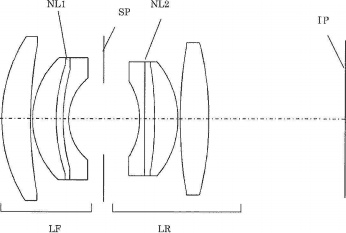
That's what a Patent spotted by Egami (translated) appears to suggest, if I am not misunderstanding the poor machine translation:

Canon SLR full size corresponds to 50 mm F1.2 and corresponds to the full size mirror-less 50 mm F2 of the patent is pending. Because large-diameter lens symmetrical with the axial chromatic aberration is corrected by using the anomalous dispersion glass which has been optimized, you can expect the performance. We are starting to design-conscious companies with full size mirror-less, the emergence of full-fledged full size mirror-less would be a matter of time.

Patent description:

  • Patent Publication No. 2012-247451
    • Release Date 2012.12.13
    • Filing date 2011.5.25
  • Example 1
    • Focal length f = 51.70mm
    • Fno. 1.25
    • Half angle of view ω = 22.71 °
    • Image height 21.64mm
    • 105.65mm length lens
    • BF 40.00mm
    • Nine 6 groups lens configuration
    • One one aspherical surface
    • Maximum effective diameter 45.16mm
  • Example 4
    • Focal length f = 50.00mm
    • Fno. 2.06
    • Half angle of 23.40mm
    • Image height 21.64mm
    • Length 72.62mm lens
    • BF 28.86mm
    • Eight four group lens configuration
    • No aspherical
    • Maximum effective diameter 33.34mm
  • General symmetric lens
    • Compensation of magnification chromatic aberration can be
    • Difficult to correct axial chromatic aberration and the large-diameter
  • Canon patent
    • Symmetric lens large aperture
    • Positive, aperture, arranged in the order of the positive
    • Using a high anomalous dispersion glass, the axial chromatic aberration is corrected

[via Egami]


Canon Released Updates For DPP (3.12.52), EOS Utility (2.12.3) And Picture Style Editor (1.12.2)

Updates for Canon's photo software (available here)

DPP 3.12.52 update:

  • Supports images taken with EOS 6D.
  • Supports new lens (EF24-70mm F4L IS USM).
  • Supports read-in of Picture Style files (.pf3) created in Picture Style Editor 1.12.2 and later.
  • Corrects shooting date error in other manufacturer`s image files when sent to Easy-PhotoPrintEX from Digital Photo Professional via plug-in print.

EOS Utility 2.12.3 update:

  • Supports EOS 6D.
  • Supports read-in of Picture Style files (.pf3) created in Picture Style Editor 1.12.2 and later.

Picture Style Editor 1.12.2 update:

  • Supports EOS 6D, EOS M.
  • Applied Noise Reduction processing to when displaying images.
  • Added support for the new Picture Style file (.pf3).
  • Changed the user interface of the Tool Palette.
  • Added the Tone curve (RGB) function.
  • Added the Six Color-Axes adjustment function.

[via The Digital Picture]


Canon EOS 6D Firmware Update Released

Just some weeks after having released the [shoplink 7139]EOS 6D[/shoplink], Canon made a firmware update available for its entry level full frame camera. Click here to download. The update addresses the issue concerning movie playbacks on YouTube.

Thank you for using Canon products.

Phenomenon

We have identified a phenomenon which prevents movie files shot using Canon EOS 6D Digital SLR cameras from being played back on YouTube.

Affected Product

EOS 6D Digital SLR Camera

Support

Firmware Version 1.1.2 includes the countermeasures addressing the phenomenon. The new Firmware Version 1.1.2 can be downloaded by clicking here.

Movies shot when the camera was running firmware version 1.0.9 cannot be played back on YouTube, even after the firmware has been updated to 1.1.2. In order to playback these movies on YouTube (movies captured when the camera was running firmware version 1.0.9) please follow the instructions below.

1. Download the movie file(s) from the EOS 6D camera to your computer.

2. Start ImageBrowser EX, an application bundled with the EOS 6D.

3. After selecting the movie file(s) to be uploaded, select [Edit Movies] in the [Edit] tab from the menu bar of ImageBrowser EX.

4. “MovieEdit Task” will start. Save the movie using the [Save] menu on the screen.

5. Upload the saved movie to YouTube.

6. The movie can be played back on YouTube.

This information is for residents of the United States and Puerto Rico only. If you do not reside in the USA or Puerto Rico, please contact the Canon Customer Support Center in your region.

Please register the EOS 6D. By registering, we will be able to notify you via email when service updates are available.

Thank you,

Customer Support Operations

Canon U.S.A., Inc

Contact Information for Inquiries

Canon Customer Support Center

Phone: 1-800-OK-CANON

1-800-652-2666

TDD: 1-866-251-3752

Email: [email protected]

For additional support options: www.usa.canon.com/support

Adobe Lightroom 4.3 Update Just Released (support for EOS 6D)

Adobe released the update 4.3 for Lightroom 4 (click here).

The Adobe Photoshop Lightroom 4.3 update includes these enhancements:

  • HiDPI support within the Library and Develop Modules. HiDPI provides support for Retina-enabled Macs.
  • Additional raw file support for 20 cameras including the [shoplink 7139]Canon EOS 6D[/shoplink]
  • Corrections and bug fixes for issues introduced in previous versions of Lightroom.

Adobe Lightroom 4.x price check : [shopcountry 2813]