Above: Introduction to the new “Guided Upright” feature of Lightroom.
Adobe released updates for [shoplink 30426]Lightroom 6[/shoplink] and Lightroom CC. From Adobe:
Lightroom CC 2015.6 and Lightroom 6.6 are now available. The goal of this release is to provide additional camera raw support, lens profile support and address bugs that were introduced in previous releases of Lightroom. This release also includes a new Guided Upright feature for Creative Cloud members.
Thank you for all your feedback and passion for Lightroom.
Introducing Guided Upright
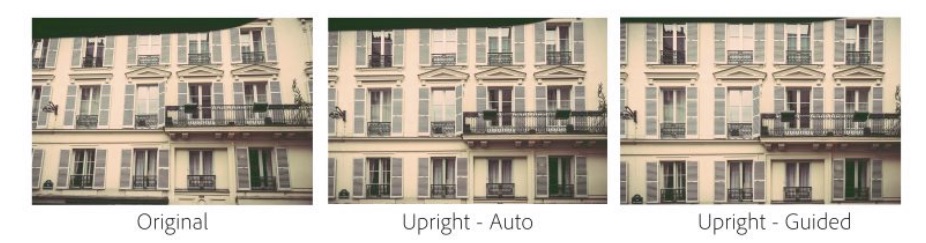
We included Upright as a tool that helped Lightroom customers easily straighten images, fix horizons, and reduce or eliminate the keystone effect in buildings. Upright works well when there are prominent vertical and horizontal lines. Not all images contain prominent lines, limiting the effectiveness of Upright.
Starting with Lightroom CC 2015.6, Guided Upright allows you to provide ‘hints’ that enable Upright to work its magic. You draw the vertical and horizontal lines directly on the image and Upright will automatically transform the image. Here’s how to get started.
- Select an image and click on the Develop Module.
- Enable Lens Profile Corrections. Upright works better with Lens Profile Corrections.
- Notice that there is a new “Transform” Panel. Transform includes both Upright and the manual perspective correction sliders together in a convenient place.
- Within Transform, click on the “Guided” button.
- Draw 2-4 guides on the image. Upright will transform the image once you draw at least 2 guides.
- Fine tune the results (if needed) with the manual transform slides, including the new X and Y transform sliders. They can be used for repositioning/moving the image within the canvas after applying strong perspective corrections to choose which part of the (warped, non-rectangular) image to show within the rectangular canvas.
Check out this great video by Julieanne Kost to learn more about Guided Upright!
New Camera Support in Lightroom CC 2015.6 / 6.6
- Canon PowerShot G7 X Mark II
- Leica M-D (Typ 262)
- Nikon COOLPIX B700
- Panasonic DMC-GX85 (DMC-GX80, DMC-GX7MK2)
Also please note that Lightroom CC 2015.6/6.6 also includes camera matching color profiles for the Pentax 645Z, Pentax K-1, and Pentax K-3 II cameras.
Additional Updates in Lightroom CC 2015.6 / 6.6
- Merge to Panorama and HDR now works with Smart Previews. Previously, Lightroom required the use of original images for the Merge to Panorama or HDR features.
- The Preferences -> Lightroom mobile section now contains a “Pending Sync Activity” section. This area is useful for helping identify any potential issues related to image sync across the Lightroom family of applications (desktop, mobile and web).
Tethered Camera Support for the following cameras:
- Canon EOS-1D X Mark II
- Canon EOS 80D
- Canon EOS 1300D / Canon Rebel T6
New Lens Profile Support in Lightroom CC 2015.6 / 6.6
| Mount |
Name |
| Canon EF |
Canon EF-S 18-135mm f/3.5-5.6 IS USM |
| Canon EF |
Canon EF 100-400mm f/4.5-5.6L IS II USM +1.4x |
| Canon EF |
Canon EF 100-400mm f/4.5-5.6L IS II USM +2.0x |
| Canon EF |
TAMRON SP 85mm F1.8 Di VC USD F016E |
| Canon EF |
TAMRON SP 90mm F2.8 Di MACRO VC USD F017E |
| Canon EF-M |
Rokinon 10mm f/2.8 ED AS NCS CS |
| Canon EF-M |
Samyang 8mm f/3.5 UMC Fish-Eye CS II |
| Canon EF-M |
Samyang 10mm f/2.8 ED AS NCS CS |
| Canon EF-M |
Samyang 100mm f/2.8 ED UMC MACRO |
| Canon EF-M |
Samyang 135mm f/2 ED UMC |
More at Lightroom Journal