Darktable Is A Totally Free Yet Powerful Alternative To Lightroom

Darktable

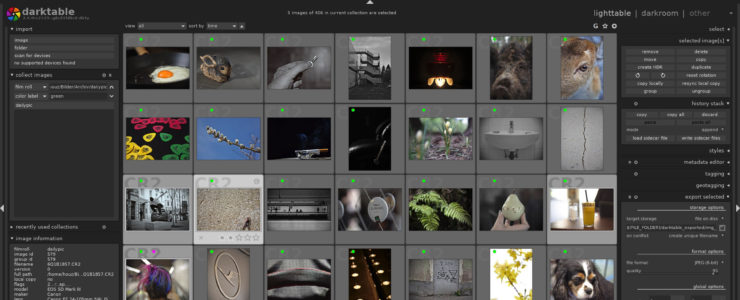
Ever wondered if you could use a photo cataloging and editing software for free, without renouncing to powerful features, and across computer platforms? Enter Darktable

Darktable (learn more) is an open source photography workflow application and raw developer. A virtual lighttable and darkroom for photographers. It manages your digital negatives in a database, lets you view them through a zoomable lighttable and enables you to develop raw images and enhance them. It has the features that most Lightroom users need. Darktable is available for Windows, Mac OS X and Linux, and it won’t cost you a penny.

The video below by Anthony Morganti gives you a very good overview. To learn more and to master it, we recommend you follow Rico Richardson feed on YouTube where you’ll find lots of tutorials. You can also have a look at the online manual.

General features of Darktable:

  • Non-destructive editing throughout the complete workflow, your original images are never modified.
  • Take advantage of the real power of raw: All darktable core functions operate on 4×32-bit floating point pixel buffers, enabling SSE instructions for speedups.
  • GPU accelerated image processing: many image operations are lightning fast thanks to OpenCL support (runtime detection and enabling).
  • Professional color management: darktable is fully color managed, supporting automatic display profile detection on most systems, including built-in ICC profile support for sRGB, Adobe RGB, XYZ and linear RGB color spaces.
  • Cross platform: darktable runs on Linux, Mac OS X / macports, BSD, Windows and Solaris 11 / GNOME.
  • Filtering and sorting: search your image collections by tags, image rating (stars), color labels and many more, use flexible database queries on all metadata of your images.
  • Image formats: darktable can import a variety of standard, raw and high dynamic range image formats (e.g. JPEG, CR2, NEF, HDR, PFM, RAF … ).
  • Zero-latency, zoomable user interface: through multi-level software caches darktable provides a fluid experience.
  • Tethered shooting: support for instrumentation of your camera with live view for some camera brands.
  • Speaks your language: darktable currently comes with 21 translations:Albanian, Catalan, Czech, Danish, Dutch, French, German, Greek, Hebrew, Hungarian, Italian, Japanese, Polish, Portugese (Brazilian and Portugese), Russian, Slovak, Slovenian, Spanish, Swedish, Ukrainian.
  • Powerful export system supports G+ and Facebook webalbums, flickr upload, disk storage, 1:1 copy, email attachments and can generate a simple html-based web gallery. darktable allows you to export to low dynamic range (JPEG, PNG, TIFF), 16-bit (PPM, TIFF), or linear high dynamic range (PFM, EXR) images.
  • Never lose your image development settings darktable uses both XMPsidecar files as well as its fast database for saving metadata and processing settings. All Exif data is read and written using libexiv2.
  • Automate repetitive tasks: Many aspects of darktable can be scripted in Lua.
[via DIY Photography]

Another AI Powered Feature Is Coming To Skylum Luminar 4, AI Structure

skylum luminar 4

The upcoming Skylum Luminar 4 seems to become a pretty powerful photo editing software.

After unveiling a preview of the AI Sky Replacement feature, Skylum teases another Luminar 4 feature powered by artificial intelligence algorithms, AI Structure. The 1 minute video below introduces the feature.

You can pre-order Skylum Luminar 4 at a special early bird price.

The actual version, Luminar 3, can be purchased with an exclusive $10 discount by using code WATCH at checkout.

Skylum Luminar 4 AI Structure explained:

Content-aware

Boosting details with traditional Clarity and Structure tools often make parts of a photo look horrible. Luminar 4 automatically identifies objects (including people and faces, clouds, water, buildings and more) and improves them in an intelligent, content-aware way.

Human-aware

The AI Structure tool automatically detects people in a photo and doesn’t overprocess them. As a result – faces and skin look natural, while the objects around them looks deeper and richer.

No noise, no halos, no artifacts

AI Structure is excellent at improving dynamic range and adding texture and clarity. What’s even better – it doesn’t add noise, halos or other artifacts.

No manual selections needed

There’s no need to make a selection. You don’t have to use layers or masks. In traditional editors, you cou

This Is What Skylum Luminar 4’s AI Sky Replacement Delivers (and it’s impressing)

luminar 4

Skylum posted a sneak preview of the AI replacement feature of the upcoming Luminar 4 photo editing software. And it’s pretty impressing in our opinion. See for yourself in the short video below.

You can pre-order Skylum Luminar 4 at a special early bird price.

The actual version, Luminar 3, can be purchased with an exclusive $10 discount by using code WATCH at checkout.

Luminar 4 With AI Sky Replacement Technology Announced, Preorder Now And Save

Luminar 4 sky replacement

Skylum announced Luminar 4 with Sky Replacement technology. Laminar 4 will be released in Fall 2019. If you preorder now you can save.

You can save on two Luminar 4 bundles:

Press release:

Sky’s the limit: Luminar 4 introduces the first automatic Sky Replacement technology

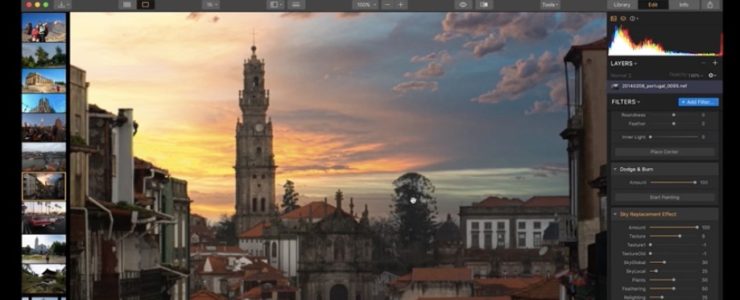
Utilizing the proprietary technology based on machine learning, Luminar 4 will be the first photo editor to have a fully automated Sky Replacement tool to save the artists hours of editing.

BELLEVUE, WA – July 23, 2019 — Today, Skylum announces the upcoming release of Luminar 4, set to ship this fall. Skylum continues to push innovations forward through machine learning tools. In addition to the new AI Sky Replacement tool, Luminar users can expect to see more machine learning present in Luminar 4. With its easy-to-use interface and sensible workflows, Luminar 4 is a great choice for creatives looking to move their photography forward.

“With Luminar 4 we continue to empower everyone who loves photography to make incredible images faster and easier,” said Alex Tsepko, CEO of Skylum. “No one needs a “simply another photo editor” these days. That’s why with every Luminar update we bring photographers something truly meaningful, something that will really level up their creative skills.

In Luminar 2018, Skylum introduced the AI Sky Enhancer filter, helping to add depth and color back into flat or blown-out skies. Earlier this year, Skylum added the Accent AI 2.0 filter to Luminar 3, a powerful content aware filter powered by machine learning to automatically enhance images. Now, with Luminar 4, AI Sky Replacement offers the first automatic tool for replacing skies. Machine learning tools like these are the foundation of the Luminar platform, helping to save photographers hours of manual labor so they can achieve their creative dreams.

Why AI Sky Replacement?
Sky replacement methods have become popular in recent years with landscape photographers, in order for them to truly showcase their creative vision. Up until now, photographers have spent minutes or even hours manually replacing skies, through tools like Smart Selection, Luminosity Masking, Overlaying, Layers, Masking, Smart Brush, Color Range and more. And even with all those tools, it was hard to get a perfect sky.

While development of AI Sky Replacement has been equally challenging, Skylum’s machine learning technology means that photographers can apply a realistic sky to their photograph in mere seconds, freeing up time to be more creative.


Click here to open the rest of the article