Canon announce two new budget friendly PIXMA printers (TS205 & TS305)

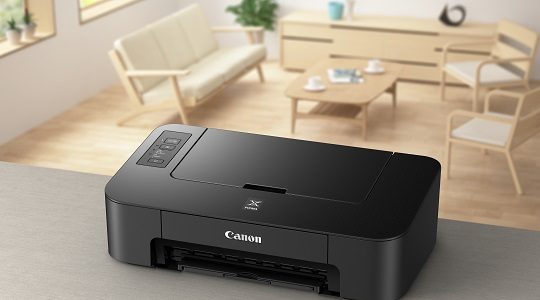
Canon Pixma TS205
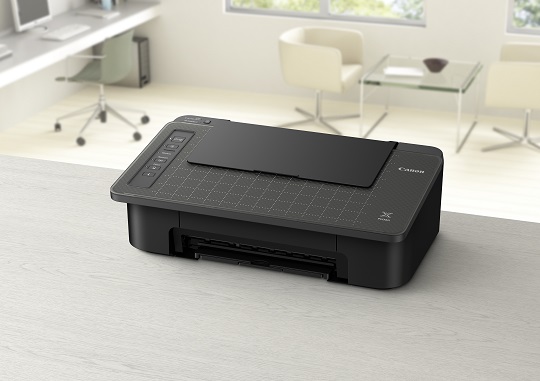
Canon Pixma TS305
Canon Pixma TS305

The Canon PIXMA TS205 will sell for €49 and the PIXMA TS305 for €59. Canon press release (and press release in German):

Keep your stories alive with stunning prints: Canon launches PIXMA TS205 and PIXMA TS305 for affordable, convenient home printing

London, UK, 5 December 2017 – Canon Europe, a world-leader in imaging solutions, has today announced the launch of two new home printers as part of its PIXMA range: PIXMA TS205 and PIXMA TS305.

  • Ideal for families and students, the affordable, compact, stylish printers are easy-to-use
  • Borderless 4×6” photos in beautiful crisp colours can be printed at home
  • With Wi-Fi connectivity, prints can be sent direct from a smart device to the PIXMA TS305
  • Copy and convert smartphone images into PDFs with the PIXMA TS305 using Canon’s exclusive Smartphone Capture and Copy

Borderless printing at home
Printing cherished moments with friends and family is made easy with the new PIXMA printers. Whether creating a photo collage or pinning a photo on the fridge at home, PIXMA TS205 and PIXMA TS305 print 4×6” borderless photos in just 65 seconds.

For the perfectionists in the family, Canon ink provides only the best. A pigment black ink for printing the sharpest texts and dye colours for the most vivid colour to achieve the highest quality printing.

Boost productivity
PIXMA TS205 and PIXMA TS305 have been designed with productivity and cost-efficiency at the heart, with features like the automatic ‘power on and off’ mode to save on energy costs whilst the printer is not in use. Users can also print and copy entire documents with improved bottom margins, and optional XL cartridges mean less refills and more printing. The Black XL cartridge can print approximately 2.2 times more prints compared to standard cartridges, representing fantastic value.

Time-consuming manual paper changes can be avoided as the printers come with hassle-free paper detection sensors.

Wi-Fi connectivity
Get online with PIXMA TS305, compatible with AirPrint1 and Mopria2 to benefit from wireless connectivity. Printing from your smartphone or tablet couldn’t be quicker or more convenient.

Download the Canon PRINT app3 for iOS and Android to get more from your printer. Print from your mobile device as well as from apps using PIXMA Cloud Link, whether it’s your latest Instagram selfie or important documents from Google Drive.

Stay connected with the PIXMA TS305 at every moment, even if your wi-fi connection lets you down, your printer wont. Easily and simply select wi-fi modes, choosing to connect via the conventional wi-fi router method, or without a router via the access point mode.

Connect via Bluetooth4 technology
Never worry about a paper jam or running out of paper half way through a print again. When the PIXMA TS305 is connected via Bluetooth, the Canon PRINT app lets you know about errors before they become a problem, directing you to the online manual with easy troubleshooting steps to follow.

Print and copy
The brand new PIXMA TS305 offers users the added benefit of copying, like a multi-function printer, when connected via the Canon PRINT app. The handy Smartphone Capture & Copy function allows users to take a photo of any document on their smartphone, be it a bus timetable or water bill, and convert it to a PDF to be saved, shared or printed.

The PIXMA TS305 has a specially designed grid top allowing you to neatly place your document on the printer; ready to copy and convert at the touch of a button. Even when capturing the document at an angle, the app straightens it up for a professional look every time.

Fun for the family
With the PIXMA TS305 you can send personalised, unique messages with Canon’s Message in Print5 app and share your stories with friends and family in a new, fun way. For a thoughtful touch embed invisible messages, such as a birthday message or YouTube video, for only your loved ones to see .

The entire family can now print like never before with the new PIXMA TS205 and PIXMA TS305. Whether printing important documents or bills on the PIXMA TS305 with the Canon PRINT app or having fun with personalised messages; the new printers meet the needs of everyone6.

Click here to open the rest of the article

Canon EOS M100 review (impressing & very easy to use, S. Huff)

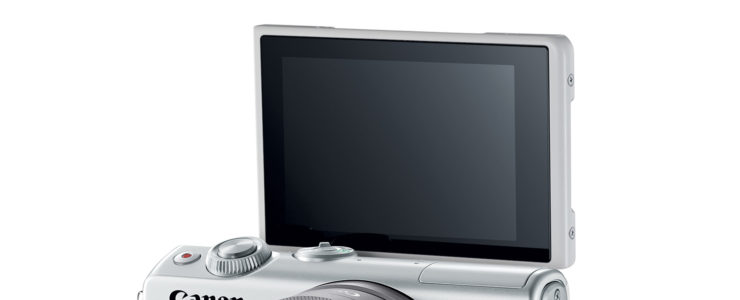
Eos m100

The Canon EOS M100 starts at 499:Adorama | B&H Photo | Amazon Canon Store

At a glance:

  • 24.2MP APS-C CMOS Sensor
  • DIGIC 7 Image Processor
  • 3.0″ 1.04m-Dot Tilting Touchscreen LCD
  • Full HD 1080p Video Recording at 60 fps
  • Built-In Wi-Fi with NFC, Bluetooth
  • Dual Pixel CMOS AF
  • Up to 6.1 fps Shooting and ISO 25600
  • Creative Assist and Self Portrait Mode

Steve Huff posted his review of the new Canon EOS M100 (specifications, and price in your country), Canon’s latest and most entry-level mirrorless camera.

From his conclusion:

If you are starting out and want a small mirrorless, check it out.

If you want an upgrade from your phone, this will do it without killing your bank acct.

If you want a small “cute” camera that can fit in a bag, purse, or big pocket then the M100 should be on your list

If you want a great travel camera for video or photo without spending huge money on a serious camera with more features, the M100 should be looked at.

If you want to get into VLOGGING without spending a ton up from I would recommend the Canon M6 as it has a mic input but even the M100 can do for you in the beginning. The video AF is very quick and snappy. IQ is nice and color is typical Canon. Which is good.

So for beginners, those who want to upgrade from a phone, anyone getting into vlogging, those who travel and want small or anyone who just wants a fun point and shoot style IC camera. Read the review…

The EOS M100 is getting one enthusiastic review after the other. Seems Canon managed to do anything right with the EOS M100. More featured Canon EOS M100 reviews.  You can download the EOS M100 user manual, in case you want to learn more about Canon’s latest MILC.

Canon EOS M100: [shoplist 47242]

Cann EOS C300 Mark III around the corner? [CW3]

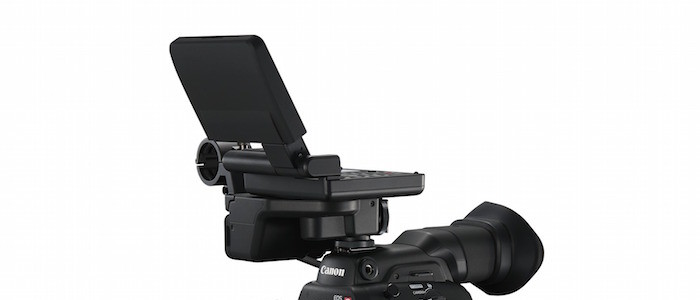
Canon cinema EOS C300 Mark III

A rumor from a new source (thanks), which reach also other places. It’s suggested Canon may soon announce the Canon EOS C300 Mark III, possibly before NAB 2018.

These specifications are rumored:

  • new 6K sensor (though 4k video only
  • up to 120 fps in 4K, internal + external Raw
  • new developed on-sensor image stabilization
  • price tag above current C300 Mark II (will not be discontinued)

Stay tuned.

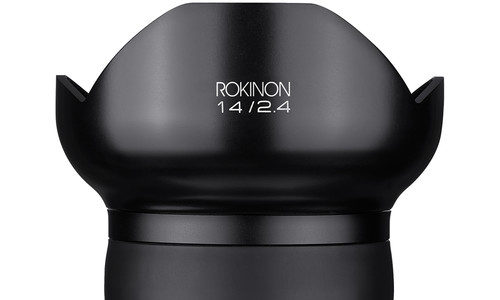
Deal: Rokinon SP 14mm f/2.4 Lens (Canon mount) – $749 (reg. $999)

rokinon 12mm

Rokinon SP 14mm f/2.4 at a glance:

  • EF-Mount Lens/Full-Frame Format
  • Aperture Range: f/2.4 to f/22
  • 2 Aspherical, 2 ED, 3 HR Elements
  • Hybrid Aspherical Element
  • Ultra Multi-Coating
  • Manual Focus Design
  • Aluminum-Alloy Lens Housing
  • Nine-Blade Diaphragm
  • Built-In Petal-Shaped Lens Hood

B&H Photo has the Rokinon SP 14mm f/2.4 Lens (Canon EF mount) on sale at $749. Compare at $999. Ends tomorrow, 12/5/2017.

Black Friday/Cyber Monday galore is listed here. There is more to check if you’re looking for good deals. Have a look at the following links. Today’s Gold Box and one day only deals at Amazon USAmazon DEAmazon UKB&H Photo, eBayAdorama, and refurbished lenses and DSLRs at Canon Store (check the refurbished listings at Canon Store whenever you have time for it, the best deals hide there).

Why photographer Armando Ferreira switched from Sony to Canon

Contrary to what most most Sony fan sites want you to believe, there are many photographers who switch from Sony to Canon, or who switch to Sony and deeply regret it.

Photographer Armando Ferreira explains why he made the switch from using Sony cameras like the Sony A7RII and also the Sony A7SII to the Canon 5D Mark IV.

Because Canon gear works as advised, maybe…?

Canon EOS 5D Mark IV product advisory: a firmware update is coming, but in February 2018

eos 5d mark v

Canon released product advisory for the Canon EOS 5D Mark IV (specifications, and price in your country).

Future Firmware Plan for the EOS 5D Mark IV

We would like to inform you that release of firmware to enhance functions of the EOS 5D Mark IV, which was originally scheduled for November 29 at the same timing as the firmware updates for six other models (EOS-1D X Mark II: Ver.1.1.4; EOS-1D X: Ver.2.1.0; EOS 5D Mark III: Ver.1.3.5; EOS 5DS: Ver.1.1.2; EOS 5DS R: Ver.1.1.2; EOS 6D Ver. 1.1.8), has been postponed until late February 2018 for reasons related to firmware preparation. We would like to offer our sincere apologies to users of this product who have been inconvenienced.

In the firmware to enhance functions of the EOS 5D Mark IV, we are planning to incorporate the following enhancements:

  1. Support will be added for chromatic aberration correction, peripheral illumination correction, distortion correction, and Digital Lens Optimizer when using Digital Photo Professional to process RAW images captured with the following TS-E lenses: TS-E 17mm f/4L, TS-E 24mm f/3.5L II, TS-E 50mm f/2.8L MACRO, TS-E 90mm f/2.8L MACRO, or TS-E 135mm f/4L MACRO.
  2. Support will be added to fix a phenomenon* in which standard exposure may not be obtained, or an irregular exposure may result, when Silent LV (Live View) shooting with the following TS-E lenses: TS-E 50mm f/2.8L MACRO, TS-E 90mm f/2.8L MACRO, or TS-E 135mm f/4L MACRO.
  3. Support for Exif 2.31 will be added.

*This phenomenon occurs when tilt or shift is applied on a TS-E lens (TS-E 50mm f/2.8L MACRO, TS-E 90mm f/2.8L MACRO, or TS-E 135mm f/4L MACRO) during LV shooting when Silent LV shooting is set (set to Mode 1 or Mode 2 on the menu). For this reason, until the firmware update, when performing viewfinder shooting or LV shooting, please shoot with the Silent LV shooting set to [Disable].