Canon Professional Network Lightroom 5 Tutorial: Local Adjustements (pt. 4)

Lightroom 5 Tutorial

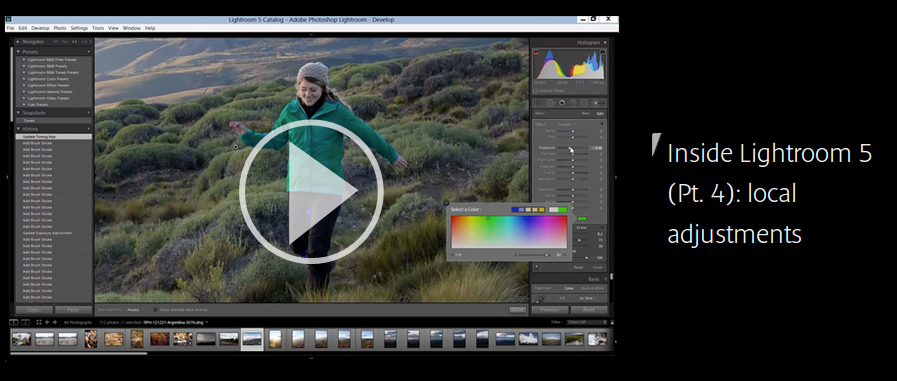
Canon Professional Network published part 4/5 of their ongoing Lightroom 5 tutorials: Local Adjustments.

In Part 4 of this series Richard Curtis looks at all of the local adjustment options in Lightroom and, in a special video, he reveals how to edit elements of your pictures using local adjustments.

There is a video to watch, and the following topics are covered (also in text form):

  • Graduated Filter
  • Operating the Graduated Filter
  • Cloning and Healing
  • Operating the Clone/Heal Tool
  • Adjustment Brush
  • Adjustment Brush: add depth to foreground shadows
  • Adjustment Brush: change the colour of a person’s jacket
  • Adjustment Brush: change the brightness of whites in eyes
  • Crop Tool
  • Radial Filter
  • Red-Eye Reduction Tool

Lightroom 5 price check: [shopcountry 13714]

Canon Enters Monitor Market With 4K Reference Display

Reference Display

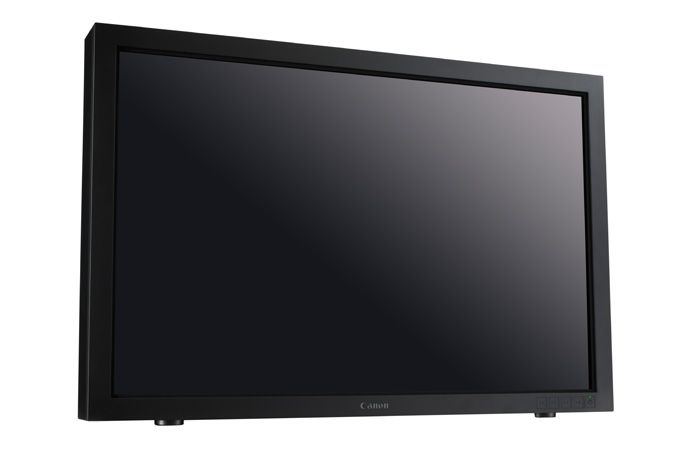
Well, this came as a surprise. Canon’s foray into the display market with a 30-inch reference display specifically designed for colour grading and high quality 4K video production. One more step to confirm Canon’s commitment to videography.

Reinforcing Canon’s continued commitment to the broadcast and cinema industries, the new DP-V3010, together with Canon’s Cinema EOS System, offers a first-class input-to-output solution for 4K digital cinema and wider video production workflows.

With a technical specification designed to provide repeatable, accurate output, the DP-V3010 is optimised for use in scenarios such as colour grading, where overall image quality and consistency are of paramount importance. Its ability to natively display high resolution 4K images and a range of colour options means that the DP-V3010 is also well suited for use on-set or on location, and for other digital imaging tasks including CGI work, Computer Aided Design and 3D animation.

For more information see CPN’s article about the display. The specifications:

Display Unit
Panel Type Panel Type IPS (In-plane switching) LCD Panel
Screen Size 30 inches (76.1cm)
Aspect Ratio 16:10
Resolution 4096 x 2560 (10.5 Megapixels)
Active Display Area Approx. 25.4 x 15.9 inches (645.1 x 403.2mm)
Pixel Pitch 157.5 ?m
Panel Driver 1024 gradations (10-bit for each RGB color)
Image Quality Brightness (Standard) 48 cd/m2 (DCI), 100 cd/m2
Viewing Angle (Up, Down, Left, Right) 89° (Contrast ratio 10:1 or higher)
Surface Treatment Low-reflection glare
General Backlight Type RGB LED (direct down type)
Power Rated Voltage: 100 – 240V AC
Rated Frequency: 50/60 Hz
Power Consumption At maximum load (including change in brightness through aging): Approx. 370 W
At factory shipment: Approx. 130 W
Environmental Conditions Operating Temperature and humidity:
41 – 95°F (5-35°C), 20 – 80% RH (no condensation) [Recommended: 59 – 86°F (15-30°C)] Pressure: 700 – 1060 hPa
Storage /
Transporting
Temperature and humidity:
-4 – 104°F (-20 – 40°C), 10 – 85% RH (no condensation);
105 – 140°F (41 – 60°C), 10 – 40% RH (no condensation)
Pressure: 700 – 1060 hPa
Dimensions (W x H x D) Approx. 27.9 x 18.7 x 7.4 in. / 708 x 474 x 189mm
Weight Approx. 52.8 lb. / 24kg
Mounting Hole Pitch VESA Standard 200 x 200mm (7.9 x 7.9 in.)
Interface Input 3G/HD-SDI 8 (2 systems) BNC (75Ω) receptacle terminals
DisplayPort 4 (1 system, version 1.1a compliant)
Output 3G/HD-SDI 8 (2 pass-thru systems)
Control USB 1 (revision 2.0 compliant High Speed mode compatible) USB A receptacle port
LAN 1 RJ-45 terminal
Supplied Accessories Display Controller, AC Power Cord, Compact Power Adapter, AC Cable, Tip Prevention Fitting, LAN Cable, Rack Mount Bracket, Rack Mount Bracket Screw, Hex Key, Instruction Manual, Instruction Manual Disc

Canon USA press release after the break.

Click here to open the rest of the article

Tamron Announces 150-600mm f/5-6.3 VC Superzoom (Update)

150-600mm

Update: thanks to reader Steve, here is last year’s patent for the lens.

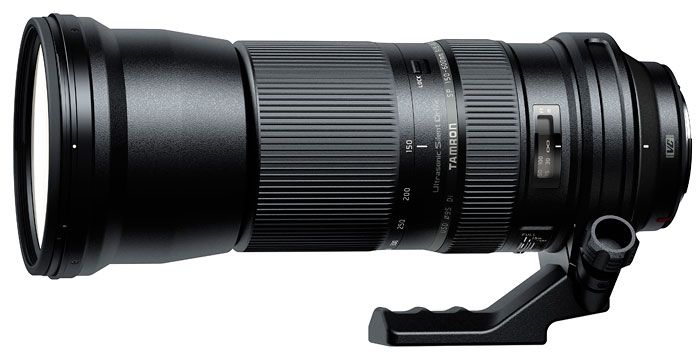
We thought it was an already amazing 150-500mm lens but Tamron surprised us with a even broader zoom range: 150-600mm, and it has image stabilization (VC).

Cutting-edge eBAND Coating*¹ and three LD (Low Dispersion) glass elements deliver superior imaging performance, while the latest built-in VC (Vibration Compensation)*² system broadens users’ horizons in achieving sharper handheld photographs.

Specifications and press release after the break.

Click here to open the rest of the article

How Groundbreaking Is Canon’s Dual Pixel Auto-Focus? (so much to go on the C100)

Dual Pixel Auto-Focus

Canon EOS C100: Adorama | B&H

The most innovative feature Canon introduced with the EOS 70D is Dual Pixel CMOS Auto-Focus, a new AF technology that allows for fast and accurate focusing in live-view and video mode. The AF technology works so well that it outperforms conventional AF. If you were still wondering how groundbreaking Canon’s Dual Pixel Auto-Focus is, then think this: Canon offers to upgrade the EOS C100 cinema camera with the Dual Pixel AF technology. So, not just groundbreaking, but truly game-changing. An innovative technology worth to be offered as upgrade on a $8000 professional cinema camera, and a technology that obviously can make a difference even on such a high level professional gear. A technology you can have with the awesome [shoplink 14246]EOS 70D[/shoplink], available at a much lower price point.

Canon will offer the upgrade for the EOS C100 starting in February 2014 for the (relatively) cheap price of $500. The upgrade delivers the Dual Pixel CMOS AF, AF lock controls, focus presets and faster center-only focusing.

Available soon from Canon will be a factory-installed upgrade for the EOS C100 Digital Video Camera that will offer an autofocus mode to prevent motion artifacts during rapid talent and pan moves. The upgrade provides a new Continuous AF (Autofocus) Function for all Canon EF Lenses, apart from manual-focused models, using Dual Pixel CMOS AF technology. A new AF Lock setting also lets you change the image framing while holding the desired focus point. These critical focusing capabilities are designed to enhance the smooth capture of moving subjects and achieve more natural-looking autofocus so users can meet their creative needs in even more situations.

C100 owners will have to send their camera to a Canon Service Center for the upgrade. Canon has a dedicated page for the upgrade, and there is also a Canon Professional Network article about the upgrade.

Canon USA press release:

Click here to open the rest of the article